
For many business leaders, managing communication, collaboration, and workflows efficiently can be overwhelming. Between juggling compliance requirements, reducing operational inefficiencies, and ensuring cybersecurity, there’s little time left for innovation and growth. Microsoft Teams Automation offers a strategic solution, transforming the way organisations operate by streamlining processes, enhancing cybersecurity, and optimising resource allocation.
Why Automate Microsoft Teams?
Microsoft Teams Automation leverages AI-driven workflows and integrations to eliminate repetitive tasks, improve cybersecurity, and drive operational efficiency. Instead of relying on manual processes, automation enables organisations to create seamless, rule-based workflows that ensure compliance, minimise risks, and reduce human error.
For executives like CFOs and board-led decision-makers, automation isn’t just about convenience, it’s about ensuring predictable business outcomes and demonstrating a clear return on investment (ROI). The Key Benefits of Microsoft Teams Automation:
-
Reducing Operational Inefficiencies
-
Enhancing Compliance & Cybersecurity
-
Improving Cost Efficiency
It’s More Than Just a Chat Tool
While many see Microsoft Teams as a simple communication platform, it’s actually a robust automation platform. With its built-in tools and integrations, Teams allows businesses to automate processes, integrate with third-party apps, and leverage AI-driven bots to enhance productivity.
Identifying High-Impact Workflows for Automation
So, where do you start with Teams process automation? Identifying workflows that will benefit most from automation is key. Here are some high-impact areas to consider:
- Automated Notifications: Keep your team informed with real-time updates and reminders.
- Task Assignments: Automatically create and assign tasks based on predefined triggers.
- Bots & AI: Use bots for customer support and AI to optimise scheduling.
- Third-Party Integrations: Sync data across platforms like CRMs and project management tools for consistent workflows.
How Does it Work?
1. Automating Approvals & Workflows with Microsoft Teams
One of the most powerful features of Teams is its ability to automate approvals and workflows. By leveraging workflow automation in Teams, businesses can streamline approval processes, reduce delays, and ensure accountability.
How Workflow Automation Enhances Business Operations:
- Automated Approvals: Route requests to the right people and track responses effortlessly.
- Task Automation: Handle routine tasks like data entry, notifications, and report generation without lifting a finger.
Best Practices for Implementation:
- Define Clear Objectives: Identify specific processes that will benefit from automation.
- Start with Templates: Use existing templates to accelerate workflow creation.
- Monitor and Optimise: Regularly review workflows to ensure they’re functioning as intended.
2. Advanced Automation: Bots and AI
Taking your automation to the next level involves leveraging Microsoft Teams bots and AI. These advanced tools can significantly enhance your business operations by handling routine tasks and providing intelligent insights.
Key Benefits:
- Bots: Automate tasks like answering FAQs, scheduling meetings, managing reminders, and providing updates.
- AI Integration: Analyse large datasets, predict trends, and offer actionable insights to improve decision-making.
Best Practices:
- User Training: Educate employees on effectively using bots and AI tools to maximise productivity.
- Continuous Evaluation: Regularly monitor the performance of bots and AI systems to ensure they meet business goals.
3. Third-Party Integrations
In addition to bots and AI, third-party integrations can further enhance your Microsoft Teams environment. By connecting external applications, businesses can centralise information and streamline workflows.
Key Benefits:
- Seamless Integration: Connect Teams with tools like CRMs, project management software, and file-sharing platforms to unify operations.
- Enhanced Collaboration: Enable smooth data sharing and real-time updates across different platforms.
Best Practices:
- Assess Compatibility: Ensure that third-party applications are compatible with Teams and meet your cybersecurity standards.
- Integration Testing: Thoroughly test integrations to ensure they function smoothly within your existing workflows.
- Data Security: Maintain robust cybersecurity protocols to protect sensitive information shared across platforms.
Implementation
How to Implement Microsoft Teams Automation in Your Business
Ready to get started with automating tasks in Microsoft Teams?
Here’s a step-by-step guide:
- Identify Processes for Automation: Evaluate current workflows to find areas ripe for automation.
- Select Appropriate Tools: Choose the right automation tools within Teams, like bots and integrations.
- Design and Test Workflows: Create workflows and thoroughly test them to ensure functionality.
- Deploy and Monitor: Implement workflows and continuously monitor their performance.
Overcoming Adoption Challenges:
- Change Management: Communicate the benefits of automation to stakeholders and provide support during the transition.
- Training Programs: Offer comprehensive training to ensure users are comfortable with new automated processes.
- Compliance & Cybersecurity: Ensure all processes comply with data privacy regulations and security protocols.
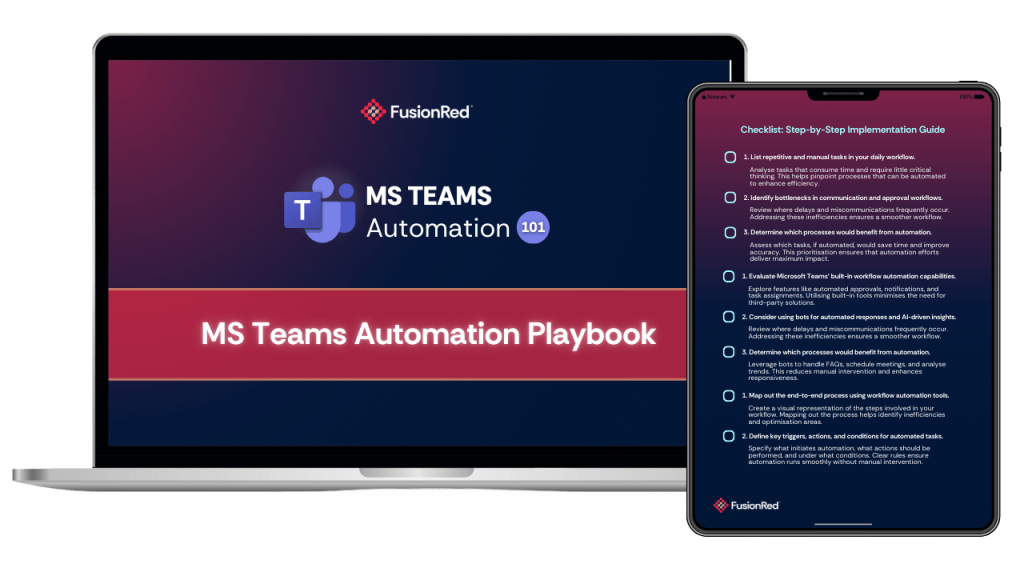
Make it Easier With Our FREE Guide!
Inside the Microsoft Teams Automation Playbook, you’ll discover:
- Step-by-step instructions for identifying, implementing, and optimising automation in Microsoft Teams.
- Best practices for using bots, AI, and third-party integrations effectively.
- Proven strategies to overcome common automation challenges and drive adoption across your organisation.
Overcoming Common Hesitations
Concern: “Is automation too complex to implement?”
Answer: Microsoft Teams offers user-friendly, low-code automation tools, making implementation straightforward without the need for deep technical expertise.
Concern: “How does automation ensure cybersecurity?”
Answer: Automated cybersecurity policies and compliance tracking minimise human error, reducing vulnerabilities and ensuring regulatory alignment.
Concern: “Will this actually improve ROI?”
Answer: By reducing manual inefficiencies, lowering compliance risks, and optimising workforce productivity, Microsoft Teams Automation provides measurable financial benefits.
Conclusion
For executives tasked with managing risk, optimising budgets, and improving operational efficiency, Microsoft Teams Automation isn’t just a tech upgrade, it’s a strategic investment. By streamlining workflows, enhancing cybersecurity, and delivering cost savings, automation empowers decision-makers to focus on what truly drives business success.
Now is the time to embrace automation and unlock new levels of efficiency within your organisation.